> ## Documentation Index
> Fetch the complete documentation index at: https://docs.celo.org/llms.txt
> Use this file to discover all available pages before exploring further.
# Using Band
By the end of this tutorial, you will understand how to query [Band](https://www.bandprotocol.com/) reference data smart contract from another Solidity smart contract on Celo.
This tutorial will go over:
* What is Band?
* Deploying an example Oracle contract that calls the Band reference data contract
* Calling the reference data contract for current rates of different assets
## What is Band?
[Band](https://bandprotocol.com/) is the data layer that trains AI engines and powers blockchain applications. By empowering DeFi, GameFi, and AI agents, it enables developers, institutions, and users to access real-time data with zero counterparty risk. With Band’s open, battle-tested data infrastructure built for blockchains and LLMs, it ensures that real-time information is always accessible—fueling everything from financial protocols to autonomous AI systems. You can read more about the specific details of the protocol [here](https://docs.bandchain.org/).
## Deploy Oracle
1. Follow [this link](https://remix.ethereum.org/?#code=cHJhZ21hIHNvbGlkaXR5IDAuNi4xMTsKcHJhZ21hIGV4cGVyaW1lbnRhbCBBQklFbmNvZGVyVjI7CgppbnRlcmZhY2UgSVN0ZFJlZmVyZW5jZSB7CiAgICAvLy8gQSBzdHJ1Y3R1cmUgcmV0dXJuZWQgd2hlbmV2ZXIgc29tZW9uZSByZXF1ZXN0cyBmb3Igc3RhbmRhcmQgcmVmZXJlbmNlIGRhdGEuCiAgICBzdHJ1Y3QgUmVmZXJlbmNlRGF0YSB7CiAgICAgICAgdWludDI1NiByYXRlOyAvLyBiYXNlL3F1b3RlIGV4Y2hhbmdlIHJhdGUsIG11bHRpcGxpZWQgYnkgMWUxOC4KICAgICAgICB1aW50MjU2IGxhc3RVcGRhdGVkQmFzZTsgLy8gVU5JWCBlcG9jaCBvZiB0aGUgbGFzdCB0aW1lIHdoZW4gYmFzZSBwcmljZSBnZXRzIHVwZGF0ZWQuCiAgICAgICAgdWludDI1NiBsYXN0VXBkYXRlZFF1b3RlOyAvLyBVTklYIGVwb2NoIG9mIHRoZSBsYXN0IHRpbWUgd2hlbiBxdW90ZSBwcmljZSBnZXRzIHVwZGF0ZWQuCiAgICB9CgogICAgLy8vIFJldHVybnMgdGhlIHByaWNlIGRhdGEgZm9yIHRoZSBnaXZlbiBiYXNlL3F1b3RlIHBhaXIuIFJldmVydCBpZiBub3QgYXZhaWxhYmxlLgogICAgZnVuY3Rpb24gZ2V0UmVmZXJlbmNlRGF0YShzdHJpbmcgbWVtb3J5IF9iYXNlLCBzdHJpbmcgbWVtb3J5IF9xdW90ZSkKICAgICAgICBleHRlcm5hbAogICAgICAgIHZpZXcKICAgICAgICByZXR1cm5zIChSZWZlcmVuY2VEYXRhIG1lbW9yeSk7CgogICAgLy8vIFNpbWlsYXIgdG8gZ2V0UmVmZXJlbmNlRGF0YSwgYnV0IHdpdGggbXVsdGlwbGUgYmFzZS9xdW90ZSBwYWlycyBhdCBvbmNlLgogICAgZnVuY3Rpb24gZ2V0UmVmZXJlbmNlRGF0YUJ1bGsoc3RyaW5nW10gbWVtb3J5IF9iYXNlcywgc3RyaW5nW10gbWVtb3J5IF9xdW90ZXMpCiAgICAgICAgZXh0ZXJuYWwKICAgICAgICB2aWV3CiAgICAgICAgcmV0dXJucyAoUmVmZXJlbmNlRGF0YVtdIG1lbW9yeSk7Cn0KCmNvbnRyYWN0IERlbW9PcmFjbGUgewogICAgSVN0ZFJlZmVyZW5jZSByZWY7CgogICAgdWludDI1NiBwdWJsaWMgcHJpY2U7CgogICAgY29uc3RydWN0b3IoSVN0ZFJlZmVyZW5jZSBfcmVmKSBwdWJsaWMgewogICAgICAgIHJlZiA9IF9yZWY7CiAgICB9CgogICAgZnVuY3Rpb24gZ2V0UHJpY2UoKSBleHRlcm5hbCB2aWV3IHJldHVybnMgKHVpbnQyNTYpewogICAgICAgIElTdGRSZWZlcmVuY2UuUmVmZXJlbmNlRGF0YSBtZW1vcnkgZGF0YSA9IHJlZi5nZXRSZWZlcmVuY2VEYXRhKCJDRUxPIiwiVVNEIik7CiAgICAgICAgcmV0dXJuIGRhdGEucmF0ZTsKICAgIH0KCiAgICBmdW5jdGlvbiBnZXRNdWx0aVByaWNlcygpIGV4dGVybmFsIHZpZXcgcmV0dXJucyAodWludDI1NltdIG1lbW9yeSl7CiAgICAgICAgc3RyaW5nW10gbWVtb3J5IGJhc2VTeW1ib2xzID0gbmV3IHN0cmluZ1tdKDIpOwogICAgICAgIGJhc2VTeW1ib2xzWzBdID0gIkNFTE8iOwogICAgICAgIGJhc2VTeW1ib2xzWzFdID0gIkNFTE8iOwoKICAgICAgICBzdHJpbmdbXSBtZW1vcnkgcXVvdGVTeW1ib2xzID0gbmV3IHN0cmluZ1tdKDIpOwogICAgICAgIHF1b3RlU3ltYm9sc1swXSA9ICJVU0QiOwogICAgICAgIHF1b3RlU3ltYm9sc1sxXSA9ICJFVEgiOwogICAgICAgIElTdGRSZWZlcmVuY2UuUmVmZXJlbmNlRGF0YVtdIG1lbW9yeSBkYXRhID0gcmVmLmdldFJlZmVyZW5jZURhdGFCdWxrKGJhc2VTeW1ib2xzLHF1b3RlU3ltYm9scyk7CgogICAgICAgIHVpbnQyNTZbXSBtZW1vcnkgcHJpY2VzID0gbmV3IHVpbnQyNTZbXSgyKTsKICAgICAgICBwcmljZXNbMF0gPSBkYXRhWzBdLnJhdGU7CiAgICAgICAgcHJpY2VzWzFdID0gZGF0YVsxXS5yYXRlOwoKICAgICAgICByZXR1cm4gcHJpY2VzOwogICAgfQoKICAgIGZ1bmN0aW9uIHNhdmVQcmljZShzdHJpbmcgbWVtb3J5IGJhc2UsIHN0cmluZyBtZW1vcnkgcXVvdGUpIGV4dGVybmFsIHsKICAgICAgICBJU3RkUmVmZXJlbmNlLlJlZmVyZW5jZURhdGEgbWVtb3J5IGRhdGEgPSByZWYuZ2V0UmVmZXJlbmNlRGF0YShiYXNlLHF1b3RlKTsKICAgICAgICBwcmljZSA9IGRhdGEucmF0ZTsKICAgIH0KfQo=\&optimize=false\&runs=200\&evmVersion=null\&version=soljson-v0.6.11+commit.5ef660b1.js) to Remix. The link contains an encoded example `DemoOracle.sol` contract.
2. Compile the contract with compiler version `0.6.11`.
3. Switch to the Deploy tab of Remix.
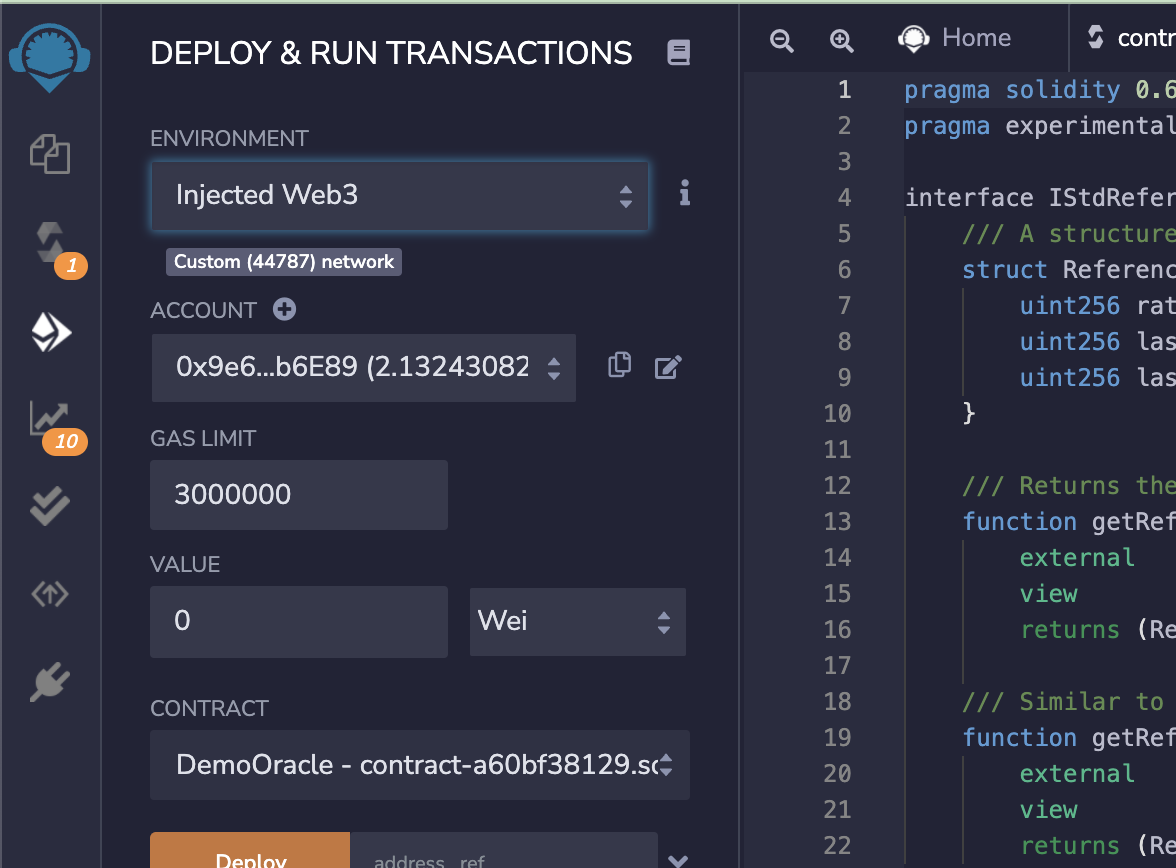
1. Select "Injected Web3" in the Environment dropdown in the top left to connect Metamask.
2. Make sure that Metamask is connected to the Celo Sepolia test network. You can read about adding Celo Sepolia to Metamask [here](/wallet/metamask/setup#adding-a-celo-network-to-metamask).
 1. Enter the Celo Sepolia testnet Band reference data aggregator contract address [`0x8c064bCf7C0DA3B3b090BAbFE8f3323534D84d68`](https://docs.bandchain.org/develop/supported-blockchains/#testnets) to the `DemoOracle` constructor and deploy the contract. You can access the reference data aggregator contract on Mainnet at [`0xDA7a001b254CD22e46d3eAB04d937489c93174C3`](https://docs.bandchain.org/develop/supported-blockchains/#mainnets). Make sure you check the **current address** on their page, as it might happen that they updated their reference contract and then your Oracle data will not be correct anymore.
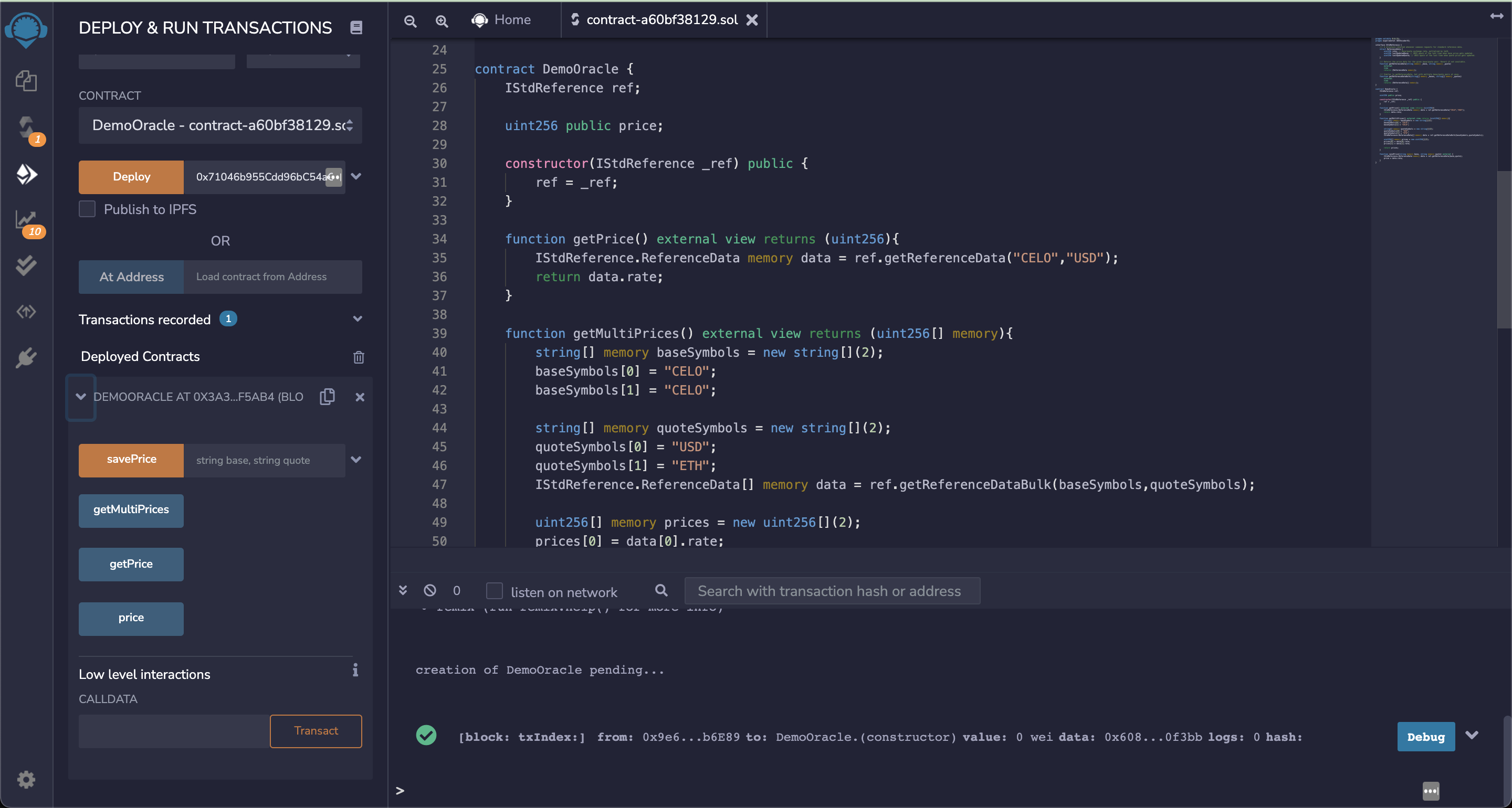 An interface to interact with the contract will appear in the bottom left corner of Remix.
## Get Rates
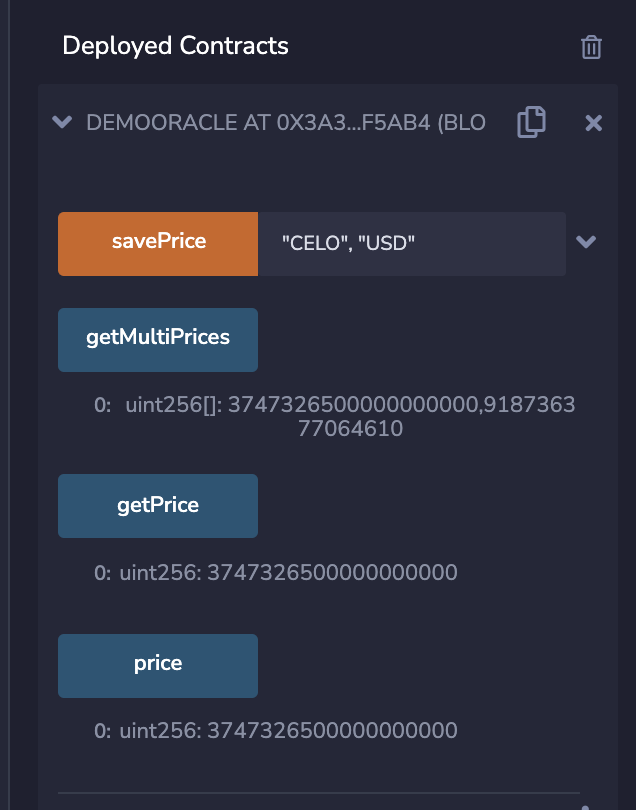
Clicking the `getPrice` button will return the current price of CELO in USD. This function calls `getReferenceData(string memory _base, string memory _quote)` on the Band reference data contract, passing "CELO" and "USD", indicating CELO as the base and USD as the quote. The rate returned is base/quote multiplied by 1e18.
An interface to interact with the contract will appear in the bottom left corner of Remix.
## Get Rates
Clicking the `getPrice` button will return the current price of CELO in USD. This function calls `getReferenceData(string memory _base, string memory _quote)` on the Band reference data contract, passing "CELO" and "USD", indicating CELO as the base and USD as the quote. The rate returned is base/quote multiplied by 1e18.
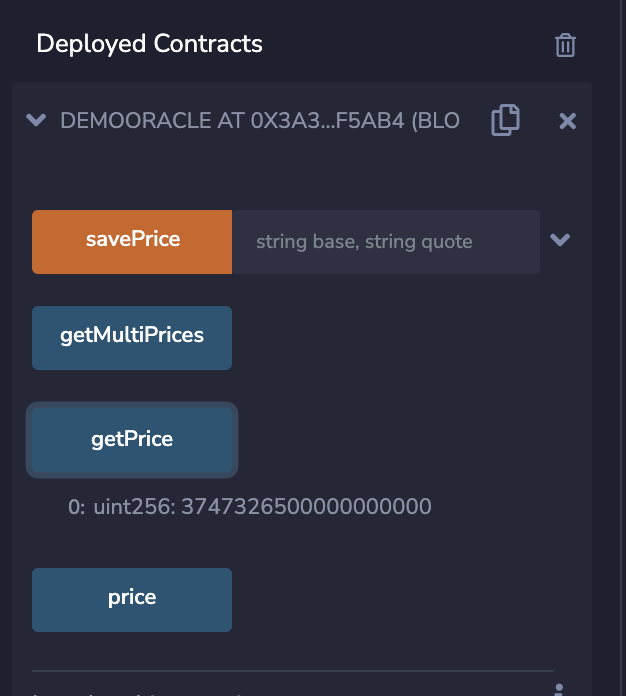 Note that the `DemoOracle` contract only returns the latest rate, but the reference contract also returns values of the last time the base and quote references were updated.
The price is offset by 1e18. The returned value at the time of testing is `3747326500000000000`. Multiplying by 1e-18 gives the current USD price given by the reference contract, 3.7473265 CELO/USD.
Clicking the `getMultiPrices` button returns multiple quotes in the same call, BTC/USD and BTC/ETH in this case. This function calls `getReferenceDataBulk(string[] memory _bases, string[] memory _quotes)` on the Band reference data contract, passing "CELO" as the base and "USD" and "ETH" for the quotes. This will return the current CELO prices in USD and ETH, as an array of integers. The call also returns just the exchange rates (multiplied by 1e18), but can be modified to return the last updated times for the bases and quotes.
Note that the `DemoOracle` contract only returns the latest rate, but the reference contract also returns values of the last time the base and quote references were updated.
The price is offset by 1e18. The returned value at the time of testing is `3747326500000000000`. Multiplying by 1e-18 gives the current USD price given by the reference contract, 3.7473265 CELO/USD.
Clicking the `getMultiPrices` button returns multiple quotes in the same call, BTC/USD and BTC/ETH in this case. This function calls `getReferenceDataBulk(string[] memory _bases, string[] memory _quotes)` on the Band reference data contract, passing "CELO" as the base and "USD" and "ETH" for the quotes. This will return the current CELO prices in USD and ETH, as an array of integers. The call also returns just the exchange rates (multiplied by 1e18), but can be modified to return the last updated times for the bases and quotes.
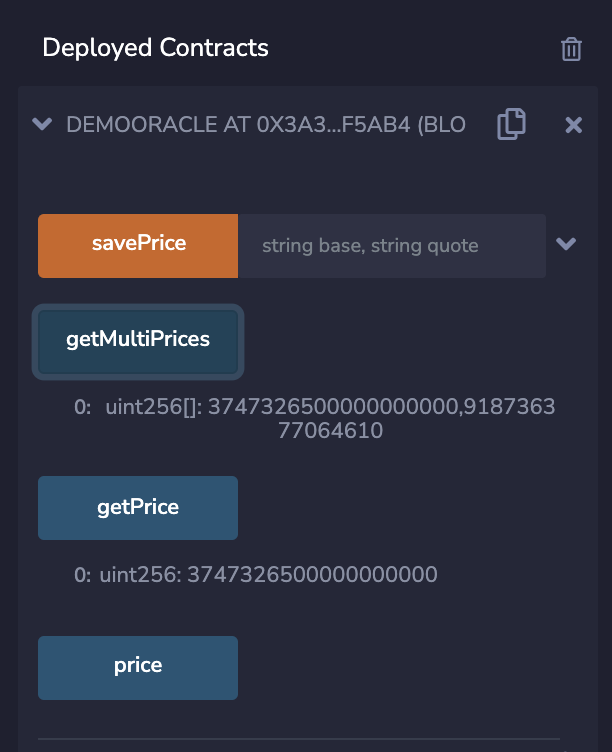 The "savePrice" function will save any base/quote rate that is passed to it in the storage variable named `price`. This storage data will only be updated when the “savePrice” function is called, so the saved `price` value will go stale unless this function is called repeatedly.
 ## Mainnet Reference Data Contract
You can access the reference data aggregator contract on Mainnet at [`0xDA7a001b254CD22e46d3eAB04d937489c93174C3`](https://docs.bandchain.org/develop/supported-blockchains/#mainnets).
## Available Reference Data
You can view the available reference data on the [Band Data site here](https://data.bandprotocol.com/).
## Bandchain.js
Band also has a javascript library that makes it easy to interact with BandChain directly from Javascript or Typescript applications. The library provides classes and methods for convenient to send transactions, query data, OBI encoding, and wallet management. You can [read more about it here](https://docs.bandchain.org/develop/developer-tools/bandchain.js/getting-started).
## Mainnet Reference Data Contract
You can access the reference data aggregator contract on Mainnet at [`0xDA7a001b254CD22e46d3eAB04d937489c93174C3`](https://docs.bandchain.org/develop/supported-blockchains/#mainnets).
## Available Reference Data
You can view the available reference data on the [Band Data site here](https://data.bandprotocol.com/).
## Bandchain.js
Band also has a javascript library that makes it easy to interact with BandChain directly from Javascript or Typescript applications. The library provides classes and methods for convenient to send transactions, query data, OBI encoding, and wallet management. You can [read more about it here](https://docs.bandchain.org/develop/developer-tools/bandchain.js/getting-started).